

Deploying Sourcegraph Executors natively on Kubernetes
Native Kubernetes executors are in beta. For production workloads, consider deploying using Terraform or the Linux binary for better long-term support.
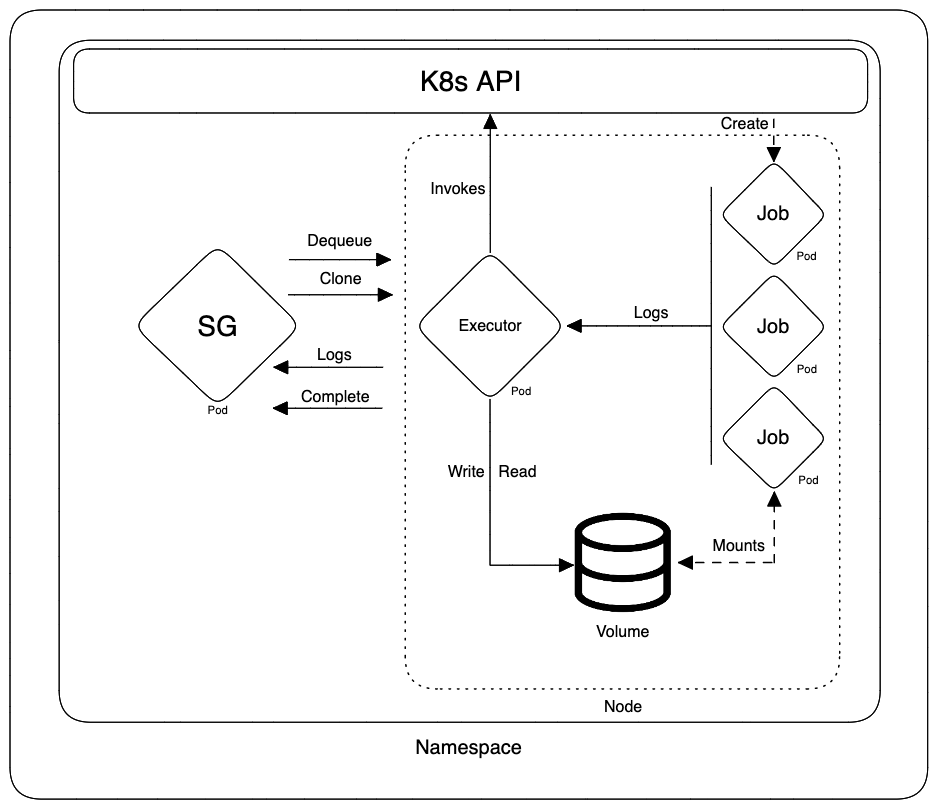
The native Kubernetes Executors have a master Executor pod that schedules worker pods via the Kubernetes API. The master Executor pod manages the lifecycle of jobs, while the worker pods process the actual batch change or precise auto indexing job specs. Review the deployment method comparison for its isolation and support status.
How it works
The executor runs as a pod and polls Sourcegraph for work. After dequeuing a job, it asks the Kubernetes API to create a job pod with its own workspace volume. The pod's first init container clones the target repository into the workspace, then each step runs sequentially as an init container in that pod. The executor streams the step logs and final job status back to Sourcegraph, then deletes the job pod.
On this page
Requirements
Executors interact with the Kubernetes API to manage the lifecycle of individual executor jobs. The following are the RBAC Roles needed to run Executors natively on Kubernetes.
| API Groups | Resources | Verbs | Reason |
|---|---|---|---|
batch | jobs | create, delete | Executors create Job pods to run processes. Once Jobs are completed, they are cleaned up. |
pods, pods/log | get, list, watch | Executors need to look up and stream logs from the Job Pods. | |
secrets | create, delete | Each job gets a Secret holding its access token and workspace files. |
Here's an example Role YAML to demonstrate the RBAC requirements for native Kubernetes Executors:
YAMLapiVersion: rbac.authorization.k8s.io/v1
kind: Role
metadata:
    name: sg-executor-batches-role
    namespace: default
rules:
    - apiGroups:
          - batch
      resources:
          - jobs
      verbs:
          - create
          - delete
    - apiGroups:
          - ''
      resources:
          - pods
          - pods/log
      verbs:
          - get
          - list
          - watch
    # Secrets are required post 5.5, when all pods run a single job
    - apiGroups:
          - ''
      resources:
          - secrets
      verbs:
          - create
          - delete
    # PVCs are required if KUBERNETES_JOB_VOLUME_TYPE is "pvc"
#  - apiGroups:
#      - ""
#    resources:
#      - persistentvolumeclaims
#    verbs:
#      - create
#      - delete
Deployment
Native Kubernetes Executors can be deployed via either the sourcegraph-executor-k8s Helm chart or by using the executors/k8s Kustomize component.
Steps
-
If you are deploying Executors for processing Batch Changes, set
batchChanges.nativeServerSideExecutiontotruein your advanced configuration. Only enable this when using Executors on Kubernetes.Note: Batch Changes on native Kubernetes executors inherits the beta limitations of the native Kubernetes runtime. See the warning at the top of this page.
-
Configure the following environment variables on the Executor Deployment:
EXECUTOR_FRONTEND_URLshould match the URL of your Sourcegraph instanceEXECUTOR_FRONTEND_PASSWORDshould match theexecutors.accessTokenkey in the Sourcegraph instance's advanced configuration- Either
EXECUTOR_QUEUE_NAMESorEXECUTOR_QUEUE_NAMEshould be set to the queues the Executor will serve. Executors that process batch changes should servebatches,batches-hooks; executors for precise auto-indexing servecodeintel. EXECUTOR_KUBERNETES_NAMESPACEshould be set to the Kubernetes namespace where you intend to run the worker pods. This should generally match the namespace where you deploy the Executor resources in the next step.
Additional environment variables may need to be configured for your Executors deployment. See here for a complete list.
-
Deploy the native Kubernetes Executor resources to your Kubernetes cluster via either the
sourcegraph-executor-k8sHelm chart or theexecutors/k8sKustomize component.- For more details on how to work with the Sourcegraph Helm chart, see the Helm chart docs (Note: The same Helm values
override.yamlfile can be used for both the mainsourcegraphHelm chart as well as thesourcegraph-executor-k8schart) - For more details on how to configure the
executors/k8scomponent for your Kustomize deployment, see the Kustomize configuration docs
- For more details on how to work with the Sourcegraph Helm chart, see the Helm chart docs (Note: The same Helm values
-
Once all the native Kubernetes Executor resources have been deployed to your cluster, confirm that the Executors are online by checking the Executors page under Administration > Executors > Instances
Upgrading executors
Upgrading native Kubernetes executors follows the same pattern as the initial deployment. Check the changelog for any executor-related breaking changes or new features.
Helm
-
Update your Helm repo to fetch the latest chart versions:
BASHhelm repo update sourcegraph -
Run
helm upgradewith the target Sourcegraph version:BASHhelm upgrade --install --values ./override.yaml --version <target Sourcegraph version> sg-executor sourcegraph/sourcegraph-executor-k8s -
Verify the executor pod restarts with the new version:
BASHkubectl get pods -l app.kubernetes.io/component=executor -
Confirm the executor is online and reporting the expected version under Administration > Executors > Instances.
Kustomize
-
Update the
deploy-sourcegraph-k8srepository to the tag matching your target Sourcegraph version. -
Re-apply the Kustomize overlay:
BASHkubectl apply --prune -l deploy=sourcegraph -f <path to your overlay output> -
Confirm the executor is online under Administration > Executors > Instances.
Additional Notes
Firecracker
Executors deployed on Kubernetes do not use Firecracker.
If you have security concerns, consider deploying via terraform or installing the binary directly.
Scale and schedule jobs
Each executor pod runs up to EXECUTOR_MAXIMUM_NUM_JOBS jobs at once (Helm value executor.maximumNumJobs, default 10). To run more jobs at once, raise that value, run more executor pods, or both. Executor pods can serve the same queues: each pod dequeues its own jobs, and no two pods get the same job. With Helm, set executor.replicas; with Kustomize, scale the executor Deployment. The most jobs that run at once is the number of executor pods times EXECUTOR_MAXIMUM_NUM_JOBS.
Several pods with fewer jobs each scale better than one pod with many jobs. Each executor pod dequeues one job at a time and has its own limit on requests to the Kubernetes API, EXECUTOR_KUBERNETES_CLIENT_QPS and EXECUTOR_KUBERNETES_CLIENT_BURST (Helm values executor.kubernetesClient.qps and burst, defaults 50 and 100), shared by all of the pod's jobs. Each job makes about 10 API calls.
Each job runs in its own pod and has its own workspace volume. By default, the workspace uses an emptyDir volume, so job pods do not need to run on the same node as the executor pod. If KUBERNETES_JOB_VOLUME_TYPE is set to pvc, the executor creates a separate PVC for each job.
Without additional scheduling configuration, the Kubernetes scheduler can place job pods on any suitable node. Use the following optional environment variables to constrain their placement:
EXECUTOR_KUBERNETES_NODE_NAMEEXECUTOR_KUBERNETES_NODE_SELECTOREXECUTOR_KUBERNETES_NODE_REQUIRED_AFFINITY_MATCH_EXPRESSIONSEXECUTOR_KUBERNETES_NODE_REQUIRED_AFFINITY_MATCH_FIELDS
For example, use EXECUTOR_KUBERNETES_NODE_SELECTOR to restrict Jobs to a dedicated node pool.
When many jobs run at once, check these Kubernetes settings on the nodes that run job pods:
- Pods per node: the kubelet runs at most
maxPodspods per node, 110 by default. Job pods over the limit stayPendingwith the eventToo many podsuntil a node frees up or the cluster autoscaler adds one. GKE and AKS set the limit when the node pool is created. - Pod IP addresses: every job pod needs an IP address from the cluster network. On Amazon EKS with the VPC CNI, a node has a limited number of IP addresses per network interface, and the CNI assigns more as pods start. When many job pods start at once, some fail with the event
FailedCreatePodSandBox ... failed to assign an IP address to container, and the kubelet retries them, which delays the job. Enable prefix delegation (ENABLE_PREFIX_DELEGATION=trueon theaws-nodeDaemonSet), or raiseWARM_IP_TARGETorMINIMUM_IP_TARGET, and check that the node subnets have enough free addresses. Other network plugins have similar per-node address ranges. - Requests: the scheduler places job pods by their requests. Job pods that do not fit stay
Pendingwith the eventInsufficient memoryorInsufficient cpu. SetEXECUTOR_KUBERNETES_RESOURCE_REQUEST_MEMORYandEXECUTOR_KUBERNETES_RESOURCE_REQUEST_CPUto what a job needs. With the defaultemptyDirworkspace, setEXECUTOR_KUBERNETES_RESOURCE_REQUEST_EPHEMERAL_STORAGEto at leastKUBERNETES_JOB_VOLUME_SIZE(default5Gi), so the scheduler does not place more jobs on a node than its disk holds. - Image pulls: by default the kubelet pulls one image at a time (
serializeImagePulls; the Amazon EKS optimized AMIs turn it off), so many new job pods on one node wait for each other's pulls. Pre-pull or mirror the step images if job pods start slowly. - API server limits: the Kubernetes API server's API Priority and Fairness can throttle a busy executor's service account. Check for HTTP 429 responses in the executor logs.
- Quotas: a
ResourceQuotain the job namespace can cap pods, Secrets, Jobs, CPU, or memory. When a job pod would go over it, Kubernetes does not create the pod (eventexceeded quota), and the Job controller retries with a growing delay while the job holds an executor slot. Keep the job pods' requests, timesEXECUTOR_MAXIMUM_NUM_JOBS, times the number of executor pods, within the quota. - Pod Security: in a namespace that enforces the
restrictedPod Security Standard, the API server rejects the executor pod and job pods without a restricted security context (eventviolates PodSecurity "restricted:latest"). Set the executor pod's with the Helm valuesexecutor.podSecurityContextandexecutor.containerSecurityContext. Run job pods as a non-root user withKUBERNETES_RUN_AS_USERandKUBERNETES_RUN_AS_GROUP, and set their containers' security context withKUBERNETES_EXECUTOR_CONTAINER_SECURITY_CONTEXT, for example{"allowPrivilegeEscalation": false, "capabilities": {"drop": ["ALL"]}, "runAsNonRoot": true, "seccompProfile": {"type": "RuntimeDefault"}}. Steps then run as that user, so steps that need root fail.
Jobs left behind when an executor pod stops, such as during an upgrade, are deleted by Kubernetes one hour after they finish.
Firewall Rules
The following are Firewall rules that are highly recommended when running Executors on Kubernetes in a Cloud Environment.
- Disable access to internal resources.
- Disable access to
169.254.169.254(AWS / GCP Instance Metadata Service).
Docker Image
The Executor Docker image is available on Docker Hub at sourcegraph/executor-kubernetes.
Example Configuration YAML
For an example of how to configure the Executor in Kubernetes, see the sourcegraph-executor-k8s Helm chart values reference.